

Recording Studio
The Recording Studio Orientation is your gateway to joining the Recording Studio community! You must take an orientation session to use the studio.
Whether you’re a student recording audio and video for school projects, a senior recording your family oral history, or a musician, this space is for you.
Booking the Studio
- Attend an orientation in-person or online
In order to be eligible to book studio time, you must attend one orientation session, either by registering for an in-person orientation at the Library or by completing the online orientation in English, فارسی, or 中文. - Check your library card
You need a WVML card in good standing (not expired and with less than $20 in fines) to book the studio. Don’t have one? Click here to sign up online. Need help with your card? Contact us at 604-925-7400 or [email protected]. - Review the Terms and Conditions of Use
Familiarize yourself with studio policies and ensure you understand what’s expected of you when using this space. - Request a booking online
Browse the list of equipment below and add what you’d like to borrow during your booking to your booking request.
This space is generously funded by the estate of Robert Leslie Welsh through the West Vancouver Memorial Library Foundation.
In the Studio
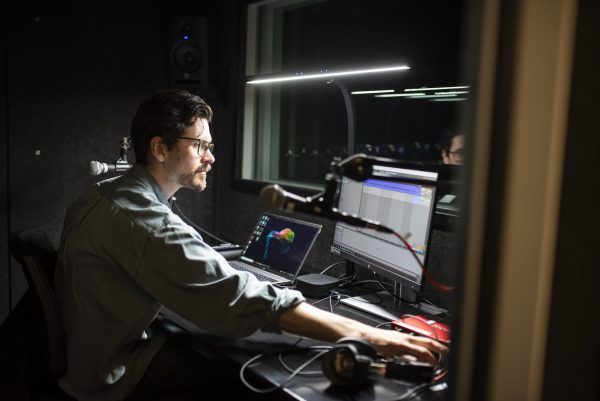
Located in the Community Computing Centre on the Lower Level, the Recording Studio includes a Control Room and Live Room. The Control Room comfortably fits two people and is suited to recording podcasts or audiobooks, or for mixing and producing electronic music or video. The Live Room fits up to four people and is suited to recording a range of musical instruments and ensembles.
Our Recording Studio features a selection of industry-standard equipment and software. You’re welcome to bring your own or use ours.
Control Room
The Control Room is equipped with a Standard Setup that is perfect for one or two people, for vocal, dialogue, or instrumental recording.
The Standard Setup includes:
- HP Zenbook Laptop with installed software:
- Audacity
- Ableton Live 11 Suite
- Reaper
- Focusrite Control
- Auxiliary monitor for two-screen display
- Yorkville SM5 Studio Monitor Speakers (x2)
- Focusrite Scarlett 18i8 USB Audio Interface
- Shure SM58 Microphones (x2)
- Triton FetHead Preamps (x2)
- Desktop Mic Boom Stand (x2)
- HeadAmp4Pro Talkback Device
Live Room
The Live Room is suitable for up to four people.
It features the following cables routed to the Control Room:
- XLR (x4)
- TRS (x4)
- 1/4″ headphone input (x4)
To record without an audio engineer in the Control Room, the following equipment is available to borrow from the CCC desk for in-studio use only:
- MacBook Air with installed software:
- GarageBand
- Audacity
- Focusrite Control
- Focusrite Control 2
- Focusrite Scarlett 4i4 (4th Gen) USB Audio Interface,
The following equipment is available to borrow from the CCC desk for in-studio use only:
- ATH-M30X Headphones (x6)
- Boom stands and counterweights (x4)
- Desktop Telescopic Mic Stand
- Quik Lok Short Mic Stand
- XLR Cables 10-ft (x4)
- Stereo Pair ¼” TRS Cables 20-ft
- ¼” TS Patch Cables 15-ft (x2)
- AKG C214 Condenser (x2)
- Behringer C-1 Large Diaphragm Condenser
- ElectroVoice RE20 Dynamic
- RODE NT1A Large Diaphragm Condenser
- RODE NT5 Small Diaphragm Condenser (Matched Pair)
- Sennheiser MD421 Dynamic
- Shure SM58 Dynamic (x2)
- Shure SM57 Dynamic
- Shure SM7B Dynamic
- Shure SM81 Condenser
- Shure Beta 52A Dynamic
- Cloudlifter CL-2 Mic Activator
- Pre73 Jr Pre-Amp
- ART Pro Audio Active DI Box (x2)
- JDI Radial Passive DI Box
- Yamaha FG800X Acoustic/Electric Guitar
- Squier Affinity Stratocaster Electric Guitar
- Squier Sonic Bronco Bass Guitar
- Kala KA-15 Concert Ukulele
- M-Audio Oxygen 49Key USB MIDI Keyboard
- LP Bongo
- Meinl Turbo Cabasa Medium
- Meinl Luis Conte Live Shaker Black
- Classic Wood Claves
- Granite Percussion Metal Shaker Chrome
- Granite Heavy Duty Tambourine
- Granite Percussion Guiros
- Multi-instrument Chromatic Tuner
- LP Bongo Stand
- Yorkville Economy Keyboard Stand
- M-Audio Sustain Pedal
User Guide
The Recording Studio is a self-guided learning environment. Please use this user guide to inform your use of our space and equipment.
Contents
Upcoming Programs
Register for a Recording Studio Orientation (required prior to booking the Recording Studio) and more creative programs to help you with your recording project. Don’t forget you can also complete the Recording Studio Orientation online.
Frequently Asked Questions
How do I book the Recording Studio?
In order to be eligible to book studio time, you must attend one orientation session. It is important that all users learn how to share and care for this fantastic new space so that everyone can enjoy it. Once you’ve taken an orientation session, complete the online booking form to request a booking. Staff will follow up with you to confirm your booking
Can I drop in to use the Recording Studio?
If you have already taken the required orientation and booked the studio previously, you may drop in to use the studio when it isn’t in use. Please check in at the Community Computing Centre desk first.
What is the Recording Studio's capacity?
The studio can accommodate up to six people. Four can comfortably fit in the Live Room and two in the Control Room.
What can I bring into the Recording Studio?
You may bring your own equipment to use in the studio. You’re welcome to bring your own computer but you will need to install the appropriate software driver to use our audio interface. Unfortunately, our studio cannot accommodate drum kits at this time. Food and drinks aren’t permitted.
Do I have to be recording during my session?
Tracking is one aspect of a recording session, but the studio can be used for mixing, mastering, or any creative aspect of an audio project. It cannot be used for unintended purposes like silent study, listening to records, hanging out, Zoom calls, etc. While we develop a user base for the space, we will permit practising musical instruments in the Live Room, but this may only be for a limited time.
What happens if I miss a booking?
If you miss two studio bookings, your booking privileges will be suspended for three months. We appreciate you letting us know if you can no longer make your booking so that we can make the space available for other creators.
Can Library staff help me with my project?
Staff can provide basic troubleshooting. The Recording Studio is a learning environment, and we encourage users to check out our variety of user guides, demonstration videos, programs in The Lab, and online resources to help you on your learning journey. We also recommend including time in your booking request so you can get familiar with the space before recording.
Do you have recording equipment I can check out to use at home?
Yes! We have microphone kits in our collection. Click here to place a hold.
Recommended Resources
These resources can help you understand the equipment and software in the Recording Studio.
In this YouTube tutorial, Mike Russell walks you through everything you need to know to get started recording with Audacity.
This tutorial series features 20 different videos covering the basics of recording solo vocals, acoustic guitar, electric guitar, piano, saxes and more.
Focusrite Control is the software used to control our audio interface. Understanding how this software works is essential to having a successful recording session.
Get started with Live or go deeper into the details—whatever stage you’re at, you’ll find videos to help you take your next steps.
In this course, music professor Rick Schmunk walks you through all the essentials of using Ableton Live 11. Click here to learn how to access LinkedIn Learning using your WVML card.
Access Information: LinkedIn Learning is licensed for West Vancouver residents, students, staff, and business owners only.
Discover how to professionally edit and mix audio with Adobe Audition CC 2019. Click here to learn how to access LinkedIn Learning using your WVML card.
Access Information: LinkedIn Learning is licensed for West Vancouver residents, students, staff, and business owners only.
In this flagship course, author Matt Mayfield demonstrates a wide array of audio and music fundamentals. Click here to learn how to access LinkedIn Learning using your WVML card.
Access Information: LinkedIn Learning is licensed for West Vancouver residents, students, staff, and business owners only.
In this course, instructor Garrick Chow demonstrates how to download and install Audacity on both Mac and Windows, record live audio, and import and play existing audio files. Click here to learn how to access LinkedIn Learning using your WVML card.
Access Information: LinkedIn Learning is licensed for West Vancouver residents, students, staff, and business owners only.
Reaper is a powerful digital audio workstation with dozens of fantastic tutorials hosted on their website.